You must set the %JAVA_HOME% and Path environment variables for jenkins.
Otherwise you should get errors like:
$ "C:\Program Files (x86)\Android\sdk/tools/android.bat" list target
Der Befehl "C:\Windows\system32\java.exe" ist entweder falsch geschrieben oder konnte nicht gefunden werden.
Ungültiger Pfad
Das System kann den angegebenen Pfad nicht finden.
- To do so follow this steps:
- Create a %JAVA_HOME% var with path to the Java jdk/jre (without /bin)
- Add %JAVA_HOME% to the Path var. Extend the string with \bin now.
- Check the result by enter javac in the cmd. If something java like is printed out you are done.
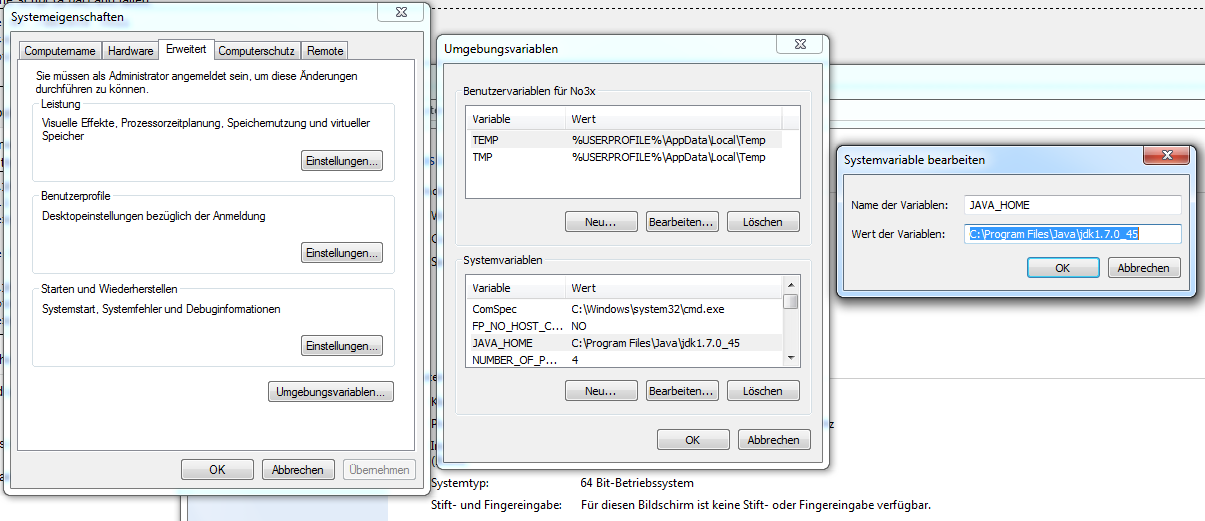
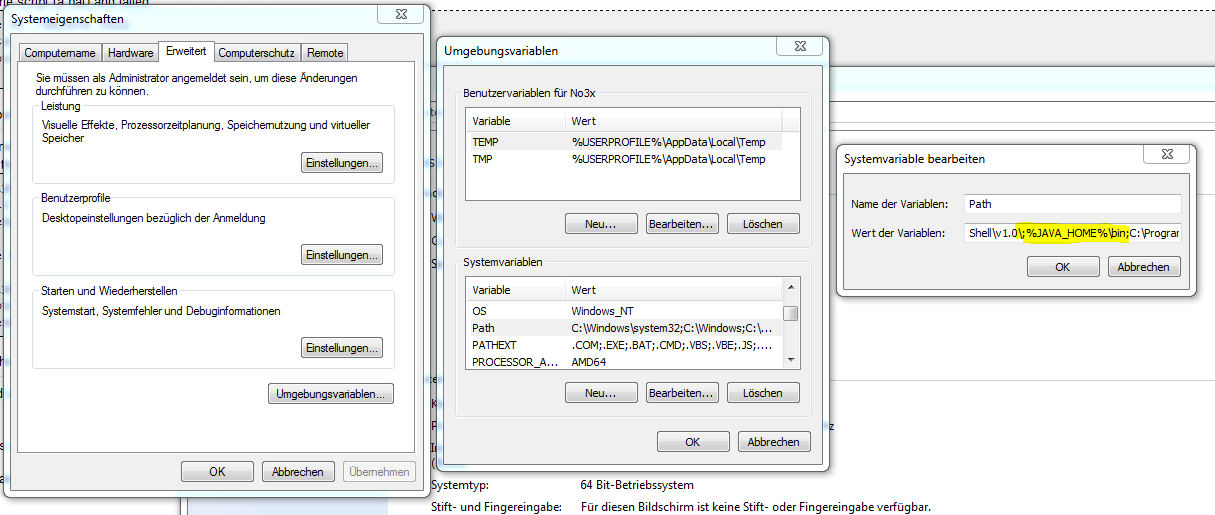
You must run Jenkins explicitly as current user
The android emulator plugin wants to access you .android folder. But it looks for it in the wrong directory. To fix this you have to run Jenkins from the according user. Otherwise you should get errors like:
java.io.FileNotFoundException: C:\Windows\system32\config\systemprofile\.android\avd\Android2.3.3API10.ini (Das System kann den angegebenen Pfad nicht finden)
at java.io.FileInputStream.open(Native Method)
at java.io.FileInputStream.(Unknown Source)
at java.io.FileReader.(Unknown Source)
at hudson.plugins.android_emulator.util.Utils.parseConfigFile(Utils.java:431)
at hudson.plugins.android_emulator.SdkInstaller$3.call(SdkInstaller.java:398)
at hudson.plugins.android_emulator.SdkInstaller$3.call(SdkInstaller.java:395)
at hudson.remoting.LocalChannel.call(LocalChannel.java:45)
at hudson.plugins.android_emulator.SdkInstaller.getPlatformFromExistingEmulator(SdkInstaller.java:395)
at hudson.plugins.android_emulator.SdkInstaller.getPlatformForEmulator(SdkInstaller.java:379)
at hudson.plugins.android_emulator.SdkInstaller.installDependencies(SdkInstaller.java:236)
at hudson.plugins.android_emulator.AndroidEmulator.setUp(AndroidEmulator.java:253)
at hudson.maven.MavenModuleSetBuild$MavenModuleSetBuildExecution.doRun(MavenModuleSetBuild.java:633)
at hudson.model.AbstractBuild$AbstractBuildExecution.run(AbstractBuild.java:562)
at hudson.model.Run.execute(Run.java:1679)
at hudson.maven.MavenModuleSetBuild.run(MavenModuleSetBuild.java:509)
at hudson.model.ResourceController.execute(ResourceController.java:88)
at hudson.model.Executor.run(Executor.java:230)
Finished: FAILURE
- To do so follow this steps:
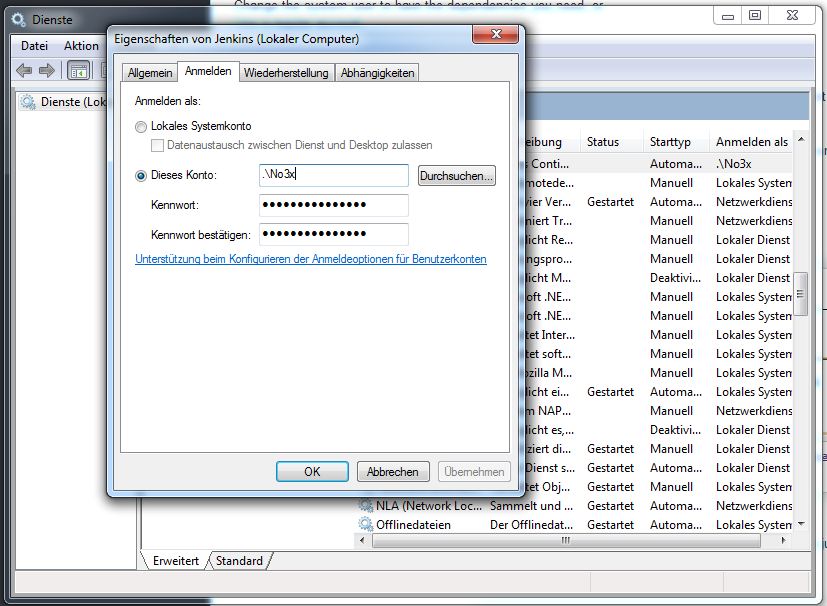
- Open the Server Window and search for “Jenkins”.
- Open the properties of this service.
- Enter in the cmd “echo %USERDOMAIN%\%USERNAME%” and copy the output into the Properties Window.
- The String is maybe changed to .\Username
- Restart the service. If you don’t receive an 1069 Error you are done.
- Otherwise: The user account must have a password. If not: create a password for this user.
Thank you that was really helpful, it solved a problem I had with maven.